Showing posts with label notebook. Show all posts

Thursday, February 16, 2012

Axioo Neon HNM: Powerful yet Friendly on the Wallet

We heard some good news a while ago: Axioo, the local Indonesian notebook brand, would be among the first to launch mobile Sandy Bridge platforms to the market. Axioo had also participated in the CES 2011 exhibition at Las Vegas on January. Not long after that, we received the Neon HNM from Axioo. This notebook is powered by a quad-core Core i7 platform based on the new Sandy Bridge architecture. The rest of its specification is no less impressive. We eagerly put it to the test to see how it would perform in our benchmarks.
In spite of the known defect on Intel’s series 6 chipset, we decided to continue the regular testing procedures. After all, this known bug would only affect performance after prolonged use, so it’s safe to say that our initial results could at least show you how a Sandy Bridge would perform. Regarding this, we have previously carried out a full test of the Sandy Bridge mobile platform where the Axioo Neon HNM was used as the baseline system. You can read the article here. In this article, we will focus more on the Neon HNM notebook itself.

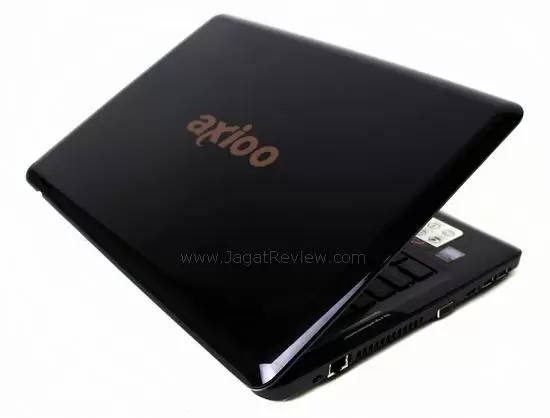
The Neon HNM is covered with smooth, black piano-finish across most of its surface, most notably on the back of the LCD and on the handrest section. We like the glossy surface because it gives the notebook some attractive looks. On the other hand, the glossy casing is a fingerprint magnet so you’ll have to clean it regularly to keep the notebook shining.
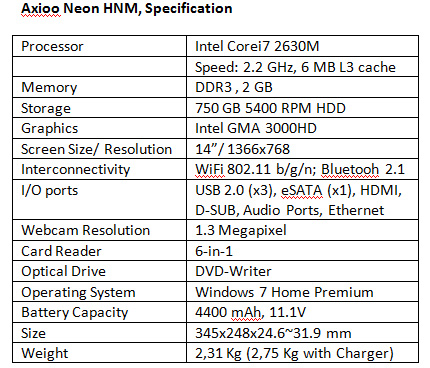
Neon HNM’s 14-inch LCD screen has a native resolution of 1366×768. On the inside, it’s powered by a combination of Intel Core i7 2630M processor and 2 GB or DDR3-RAM. The processor’s integrated Intel GMA 3000M graphics core is put into full use here. According to Intel’s claims, the IGP should be powerful enough for “casual 3D gaming”. It also provides support for DirectX 10.1 features. As for the storage, a relatively large (for a notebook system of its class), 750 GB hard drive gives plenty of storage space. In fact, Neon HNM’s hard drive is, by far, the single largest storage unit that we’ve seen on a notebook.

Features and Connectivity


Neon HNM’s I/O ports are located on the right and left side of the notebook. The eSATA connector can double as an additional USB 2.0 port when needed. We noticed that the rubber cover on the card reader slot is a bit hard to open up. Other than that, the connectors are easy to access.

Neon HNM’s chiclet-style keyboard is relatively comfortable to use, but we don’t like the piano finish that covers the gap between the buttons because it easily gets smudged by our fingerprints when we were typing on the keyboard. You’ll need some extra efforts to keep this part clean and shining.
In the middle of the hard rest section, you will find Neon HNM’s hexagonal touchpad. It supports multi-touch gesture and is both comfortable and responsive during use. The power button, as well as several shortcut keys, can be found on the upper part of the keyboard.

Performance

SysMark 2007

From the SysMark 2007 preview ratings shown above, you can see that the Intel Core i7 2630M platform (including the Axioo Neon HNM) is clearly superior compared to its Arrandale predecessor (The Core i7 7xxM/ 6xxM). The top position is occupied by another Sandy Bridge notebook that relies on the same processor, but has the advantage of using a discrete graphics card.

MobileMark 2007

Neon HNM’s 4400 mAh battery provides enough power to sustain the notebook for 226 minutes or close to 4 hours, according to our MobileMark 2007 test. Quite remarkable for a quad-core Sandy Bridge notebook that provides plenty of processing power.

Performance: Intel GMA 3000

 The on-CPU graphics is also quite powerful for an integrated solution. Updating the motherboard driver to version 2266 further improves the speed. With this kind of performance, you can expect the notebook to be able to run some lightweight 3D games at decent frame rates. For more details on how it would perform in real-life games, refer to our mobile Sandy Bridge article.


Conclusion

It’s fast alright. From the performance standpoint, the Axioo Neon HNM is clearly a winner. Even better, at just Rp. 7.000.000 (around US$ 780) it is also relatively affordable for a notebook of its class. That price will get you one of the most up-to-date mobile systems today. In our opinion, the Axioo Neon HNM offers a nice balance between price, performance, and technical specification. If not for the Sandy Bridge bug, this notebook could’ve made it to the top of the shopping list indeed.
Even though the bug does not seem to affect its performance in our test, there’s no denying that it’s present in current Sandy Bridge systems. So, would you make the purchase now, or would you rather wait for a revised version? The choice is yours.
Axioo Neon HNM

Pros

  • High performance
  • Relatively affordable for a notebook with a quad-core Core i7 CPU.

Cons

  • Let down by the Sandy Bridge defect


Monday, February 13, 2012

Lenovo G470 Notebook Review: For All Circles

by septian anis noor anom


Lenovo is known having a rigid and classic chassis design. It is caused of the majority of Lenovo products are intended for businesses. But this time the standard is not applicable. Lenovo breaks the grip through a series G470 which has a more modern shape with a different chassis design. Lenovo G470 has a chassis design with glossy black finish on the cover of the LCD screen. Unfortunately this finishing are often left your hand spot after touching it, so you need to be frequently clean, so the notebook always looks clean and beautiful.
With this more modern chassis design, Lenovo is targeting a broader market. The dimensions of this notebook are not very different from other notebook screen size 14 “. Robustness of this casing still feels at Lenovo G470. When we hands the notebook, it still feels solid and when we knock on the casing, the material doesn’t seem like a thin plastic.


Now let us glance at the inside and specifications which carried by this notebook.

Lenovo G470 Notebook Specifications:

  • Intel Core i5 2410M Processor Speed ​​2.3 GHz 3MB L3 Cache
  • Chipset Intel HM65
  • 4GB DDR3 Memory
  • Hard disk 640GB
  • AMD Radeon HD 6370M graphics
  • Screen 14 “1366 × 768
  • Interconnection 802.11bgn wifi and Bluetooth
  • USB 2.0 ports, eSATA combo, HDMI, D-Sub, Audio In / out, Ethernet
  • Webcam
  • Card reader
  • Optical Drive DVDRW
  • Operation System Microsoft Windows 7 Home Premium
  • Battery 48Wh 10.8V
  • Size (mm) 340x231x17.2 ~ 34.4
  • Weight (kg) 2161
  • Weight+ Charger  (kg) 2511
As seen the above, the Lenovo G470 uses the second generation of Intel Core processor, or that be known as Sandy Bridge. 4GB of DDR3 memory capacity is felt sufficiently qualified to support the processor to provide good performance in the middle to upper run applications. Hard disk capacity is also large enough to store your various files. Graphics provided seems quite able to run 3D games on the setting and the specific resolution which would later prove some of our 3D gaming benchmarks.

Lenovo G470 uses a screen size 14″ with a maximum resolution of 1366 × 768. About screen, Lenovo G470 uses a glossy screen. It will be a little annoying when used outdoors or a room with a beam that is too bright. However, you can minimize this by raising the level of brightness. Viewing angle is also quite good because the screen does not change color gradation that are too excessive when viewed from the left and right. The screen will change color gradation when you see it from above.
Now we move the view to the side of the notebook. In this section, you will find a variety of ports, but unfortunately Lenovo G470 doesn’t include the USB3.0 ports which were already widely found on other notebooks at this time. However, this notebook is equipped with USB2.0 eSATA combo port is enough to treat the absence of USB3.0 ports.
Practice upgrade memory and hard disk can be done easily. Lenovo G470 has only one compartment cover on the bottom, you simply open some of the bolts and opened this section with an easy to add or replace memory capacity with a larger (up to 8GB) or replace the hard disk with larger capacity (or SSD).

The inside has a different finishing to the exterior. In the handrest, it’s using black aluminum. With this finishing, you’ll seldom to see your hand spot, so it doesn’t need too often to clean it. The keys of the keyboard keys still are the typical chiclet Lenovo with a slightly curved shape. When we tried it for a while, the keyboard of the Lenovo G470 is quite soft and minimal noise. Unfortunately, the trackpad was small, multi-touch movement we’ve done a little inhibited. Left and right-click functionality is also slightly less interfere with the sound and feel tender when used.

Performance

SysMark 2007


Lenovo G470-performance classified above average because the combination of Core i5 processor combined with AMD’s Radeon graphics card to boost the whole performance. With this result, you can run a variety of middle to upper applications smoothly and play 3D games smoothly.


Baterry Life Rating


Browsing 5 Tab: This online test using the FireFox browser and refresh a website alternately with a predetermined time (example: A website refresh of 30 seconds, 40 seconds refresh the website B). We use a variety of websites, ranging from mild to use flash in considerable amounts.
720 WMV Movie and 1080 MOV Movie: We simulate to obtain the value of battery life when a notebook is used for watching movies in various resolutions and the results we got using the log-time applications.
48Wh Battery for Lenovo notebooks can only turn on the G470 for 2 hours 27 minutes for browsing activities. To watch 720P movie, Lenovo G470 can last for 3 hours 34 minutes.

Conclusion

Lenovo G470 try to offer a notebook that is remote from the notebook for business but still has the shape and design is neat and formal. With the chassis design, the user is still interested in business than to have it. If you do not really like the notebook with an odd shape with attractive colors, then this is one notebook that you can glance.
The performance offered also above average thanks to the use of AMD’s Radeon graphics. In addition to Lenovo G470 can be used for work, this notebook also qualified enough to be invited to play 3D games smoothly. Who knows, later on you can become a reliable business people in work and play games.


Plus

  • Casing feels solid

Minus

  • None USB3.0